REVEAL Configuring Alerts for the Push Service
When an account is using the Alert Webhook Service API, the REVEAL account requires the Alert Webhook Service feature to be enabled to show the following configuration options to REVEAL account administrators.
If an account administrator logs into REVEAL and does not see the following options, please contact the Customer Care team to have the account enabled.
Alert Configuration
As an administrator, log into the REVEAL UI. Please note, if you have received REVEAL integration credentials, these will not work to log into the REVEAL frontend.
Make sure the user logging in is an Administrator for the account.
Alerts
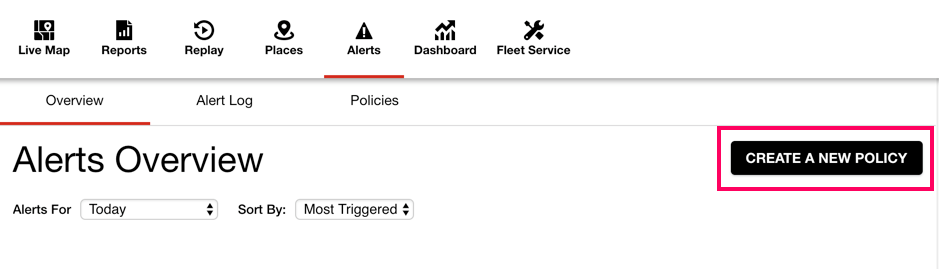
Create a New Policy: Keep in mind that Alert Webhook notifications should be created for a fleet-level, so there should be no need to create multiple policies for the same alert type. For example, do not create multiple Idle Policies unless there are different thresholds required to be monitored.
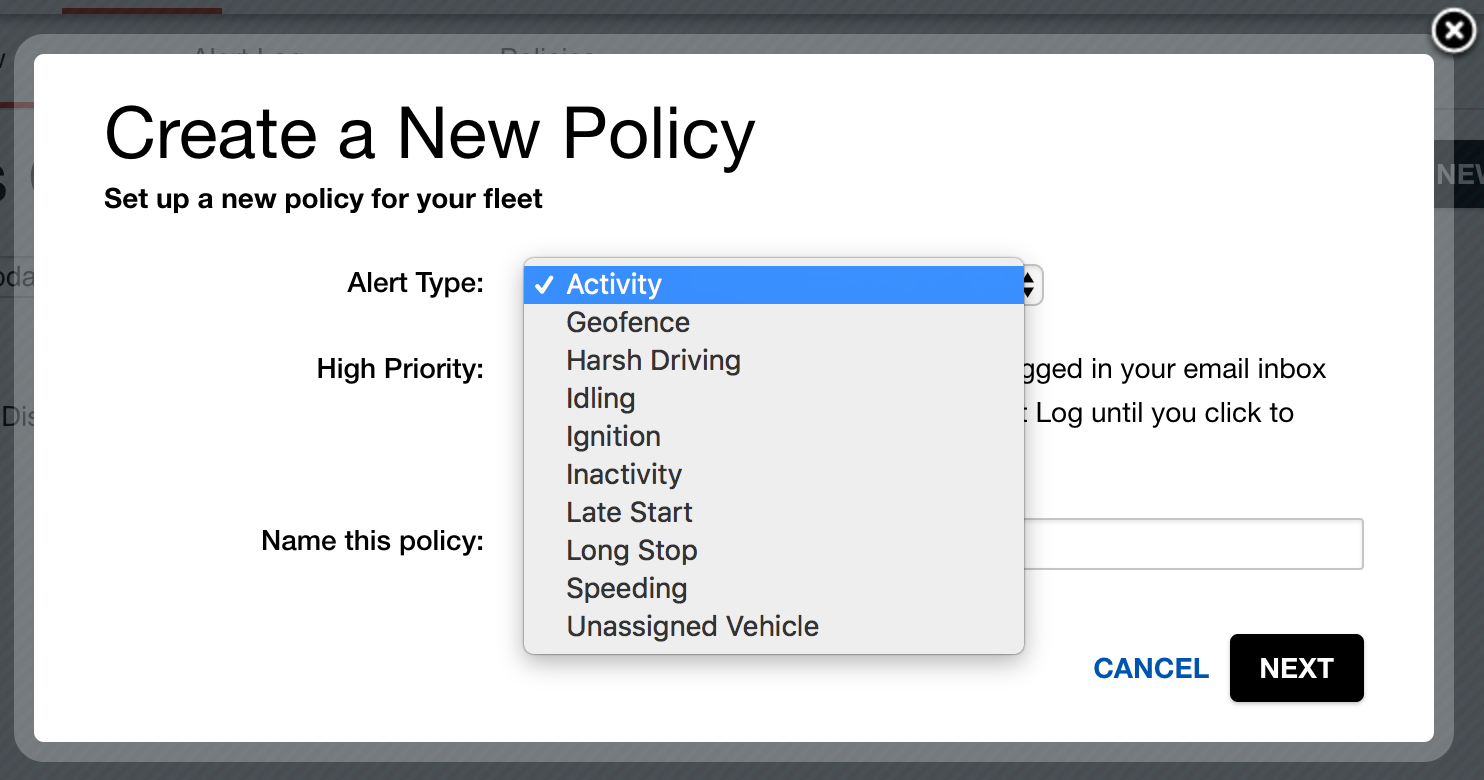
Configure the policy with the Vehicle & Alert Options and Times & Frequency selections as needed.
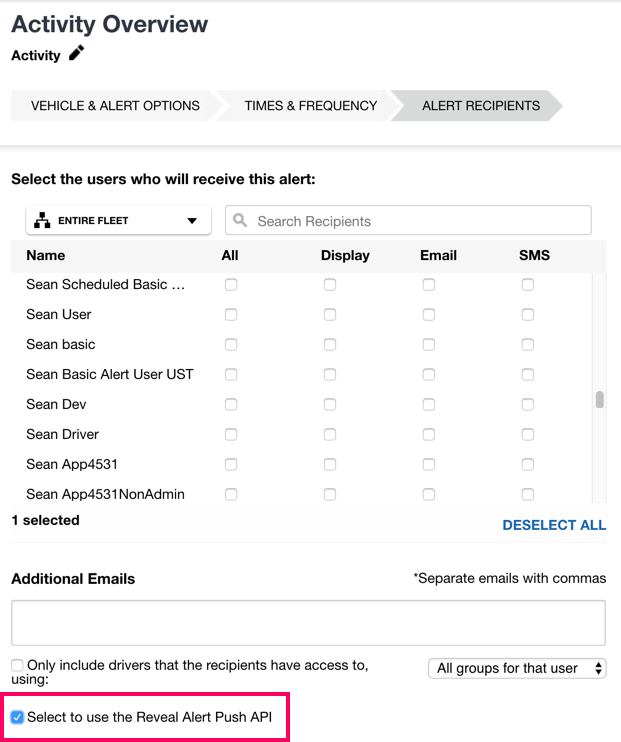
On the Alert Recipients step, there is an option “Select to use the Reveal Alert Webhook API,” as shown above, that is required to be selected.
Note that the alerts will not be sent via the API until the endpoints, username, and password details have been submitted to REVEAL’s Customer Care team with confirmation that the account has been configured.
Alert Messages by Type
Ignition
The Ignition Alert includes the following JSON message:
        {
            "AlertName": "CP TEST Ignition",
            "AlertType": "Ignition",
            "DriverName": "",
            "DriverNumber": "",
            "VehicleName": "CP TEST 3",
            "VehicleNumber": "CPTEST3",
            "Latitude": 53.30136,
            "Longitude": -6.36904,
            "Address": "16 Parkhill Ct, Kilnamanagh, Dublin 24, D24 FKN3, Ireland",
            "VehicleUpdateUTC": "2017-06-26T19:53:23",
            "VehicleIgnitionState": "OffToOn"
        }
Unique Alert Fields Include
| Field |
Description |
| Vehicle Ignition State |
Description of the ignition state activity that triggered the alert. Example outputs: “OffToOn” or “OnToOff”. |
Activity
The Activity Alert includes the following JSON message:
        {
            "AlertName": "Activity",
            "AlertType": "Activity",
            "DriverName": "CP Driver 2 Segments",
            "DriverNumber": "Charles Smith",
            "VehicleName": "CP 3",
            "VehicleNumber": "CP 31002",
            "Latitude": 53.29739,
            "Longitude": -6.37301,
            "Address": "Ard Service Station, Belgard Rd, Cookstown, Dublin 24, Ireland",
            "VehicleUpdateUTC": "2017-06-07T18:13:24",
            "VehicleActivityType": "Ignition",
            "VehicleSensor": "",
            "AlertActivityType": "Any"
        }
Unique Alert Fields Include
| Field |
Description |
| Vehicle Activity Type |
Type of activity configured to generate alerts, i.e., Ignition, movement, or sensors. |
| Vehicle Sensor |
If the vehicle being monitored has Sensors or PTOs, the sensor activity could be used as part of the activity indicators. If a Sensor is engaged when the alert generates, the Sensor’s label would show in this field. |
| Alert Activity Type |
Within the Activity alert configuration, users may select to trigger an alert based on “any” activity that occurs or for “movement only” activity. |
Inactivity
The Inactivity Alert includes the following JSON message:
        {
            "AlertName": "Inactivity",
            "AlertType": "Inactivity",
            "DriverName": "",
            "DriverNumber": "",
            "VehicleName": "CP TEST 3",
            "VehicleNumber": "CPTEST3",
            "Address": "Ard Service Station, Belgard Rd, Cookstown, Dublin 24, Ireland",
            "VehicleUpdateUTC": "2017-06-07T12:33:49",
            "VehicleInactivityMinutes": 9,
            "AlertTriggerConditionMinutes": 5
        }
Unique Alert Fields Include
| Field |
Description |
| Vehicle Inactivity Minutes |
Within the Inactivity alert configuration, users are instructed to enter the time threshold for triggering an inactivity alert in hours and minutes. Through the API, the combined total value will display in minutes. |
| Alert Trigger Condition Minutes |
The total number of inactivity minutes the vehicle has reached exceeded the threshold selected. Note, the value displayed is based on when the user selects to trigger the event:
- At the start of the event
- At the end of the event
- At both the start and end of the event
|
Harsh Driving
The Harsh Driving Alert includes the following JSON message:
        {
            "AlertName": "Safety",
            "AlertType": "HarshDriving",
            "DriverName": "Charles Smith",
            "DriverNumber": "",
            "VehicleName": "CP TEST 3",
            "VehicleNumber": "CPTEST3",
            "Latitude": 53.29744,
            "Longitude": -6.37296,
            "Address": "Ard Service Station, Belgard Rd, Cookstown, Dublin 24, Ireland",
            "VehicleUpdateUTC": "2017-06-07T12:33:49",
            "VehicleSeverity": "Moderate",
            "VehicleHarshDrivingType": "HardBrake",
            "AlertSeverityThreshold": "All"
        }
Unique Alert Fields Include
| Field |
Description |
| Vehicle Severity |
The event that triggered will be determined as either moderate or severe. |
| Vehicle Harsh Driving Type |
The user may select to trigger harsh driving alerts for hard braking, quick starts, and/or harsh cornering. Most of the time, the user will select all three event types. |
| Alert Severity Threshold |
The user may configure the alert to only trigger for moderate and/or severe. |
Excessive Idle
The Excessive Idle Alert includes the following JSON message:
        {
            "AlertName": "Idling",
            "AlertType": "ExcessiveIdle",
            "DriverName": "",
            "DriverNumber": "",
            "VehicleName": "CP 3",
            "VehicleNumber": "CP 31",
            "Latitude": 53.29744,
            "Longitude": -6.37296,
            "Address": "Ard Service Station, Belgard Rd, Cookstown, Dublin 24, Ireland",
            "VehicleUpdateUTC": "2017-06-07T12:33:49",
            "VehicleIdleMinutes": 4,
            "AlertTriggerIdleMinutes": 3
        }
Unique Alert Fields Include
| Field |
Description |
| Vehicle Idle Minutes |
The number of minutes the vehicle has idled when the alert generated. |
| Alert Trigger Idle Minutes |
The total number of minutes that the user considers to be excessive within the alert configuration. |
Speeding
The Speeding Alert includes the following JSON message:
        {
            "AlertName": "High Speed",
            "AlertType": "Speeding",
            "DriverName": "Charles Smith",
            "DriverNumber": "",
            "VehicleName": "CP TEST 3",
            "VehicleNumber": "CPTEST3",
            "Latitude": 53.29744,
            "Longitude": -6.37296,
            "Address": "Ard Service Station, Belgard Rd, Cookstown, Dublin 24, Ireland",
            "VehicleUpdateUTC": "2017-06-07T12:33:49",
            "VehicleSpeedKph": "99.972",
            "AlertSpeedLimitKph": "80.47"
        }
Unique Alert Fields Include
| Field |
Description |
| Vehicle Speed KPH |
The vehicle’s speed in kilometers per hour when the alert generated. |
| Alert Speed Limit KPH |
The speed limit in kilometers per hour that the user sets as the threshold within the alert configuration process. Note, if the value is entered within REVEAL using another regional unit of measurement, the API will convert the value into kilometers per hour. |
Long Stop
The Long Stop Alert includes the following JSON message:
        {
            "AlertName": "Long Stop",
            "AlertType": "LongStop",
            "DriverName": "",
            "DriverNumber": "",
            "VehicleName": "CP TEST 3",
            "VehicleNumber": "CPTEST3",
            "Latitude": 53.29744,
            "Longitude": -6.37296,
            "Address": "Ard Service Station, Belgard Rd, Cookstown, Dublin 24, Ireland",
            "VehicleUpdateUTC": "2017-06-07T12:33:49",
            "VehicleStopMinutes": "90",
            "AlertTriggerThresholdMinutes": "60"
        }
Unique Alert Fields Include
| Field |
Description |
| Vehicle Stop Minutes |
The number of minutes the vehicle has been stopped when the alert generated. |
| Alert Trigger Threshold Minutes |
The total number of minutes that the user considers to be a long stop within the alert configuration. |
Sensor Activation
The Sensor Activation Alert includes the following JSON message:
        {
            "AlertName": "Sensor Activity",
            "AlertType": "SensorActivity",
            "DriverName": "",
            "DriverNumber": "",
            "VehicleName": "CP TEST 3",
            "VehicleNumber": "CPTEST3",
            "Latitude": 53.29744,
            "Longitude": -6.37296,
            "Address": "Ard Service Station, Belgard Rd, Cookstown, Dublin 24, Ireland",
            "VehicleUpdateUTC": "2017-06-07T12:33:49",
            "VehicleEntityEventType": "",
            "VehicleSensorName": "",
            "VehicleSensorOnOffText": ""
        }
Unique Alert Fields Include
| Field |
Description |
| Vehicle Entity Event Type |
The sensor’s condition – switched on/off. |
| Vehicle Sensor Name |
Name of the vehicle’s sensor. |
| Vehicle Sensor On Off Text |
How the sensor is labeled when it is in the “on” or “off” state. |
Geofence
The Geofence Alert includes the following JSON message:
        {
            "AlertName": "CP 9:30AM Geofence",
            "AlertType": "GeoFence",
            "DriverName": "CP TEST 5 Test 5",
            "DriverNumber": "65435",
            "VehicleName": "CP TEST 4",
            "VehicleNumber": "77772",
            "Latitude": 53.30136,
            "Longitude": -6.36904,
            "Address": "16 Parkhill Ct, Kilnamanagh, Dublin 24, D24 FKN3, Ireland",
            "VehicleUpdateUTC": "2017-06-28T13:41:12",
            "GeofenceName": "HomeDepotEuclid",
            "AlertTriggerCondition": "NotEnteredBy",
            "ActivityExpectedBy": "2017-06-28T13:30:00",
            "VehicleGeofenceDurationMinutes": 0
        }
Unique Alert Fields Include
| Field |
Description |
| Geofence Name |
The name of the Geofence as shown within REVEAL. |
| Alert Trigger Condition |
The vehicle’s interaction with the Geofence that triggers the alert. When configuring the alert within REVEAL, the user has the options to select the following Geofence activity to be monitored:
- Entered the Geofence
- Exited the Geofence
- Both entered and exited the Geofence
- Stopped within the Geofence
- Has not entered the Geofence by a Specified Time
- Has been in the Geofence for longer than the Specified Time
|
| Vehicle Geofence Entry Time in UTC |
The date and time stamp in UTC when the vehicle entered the Geofence. |
| Vehicle Geofence Departure Time in UTC |
The date and time stamp in UTC when the vehicle departed the Geofence. |
| Vehicle Geofence Duration in Minutes |
The total number of minutes the vehicle was within the Geofence. |
Diagnostic Trouble Codes
The Diagnostic Trouble Codes (DTC) Alert includes the following JSON message:
        {
            "AlertName": "CP Diagnostic Trouble Codes",
            "AlertType": "DiagnosticTroubleCodes",
            "DriverName": "CP TEST 3 DBN-363 DONT USE",
            "DriverNumber": "CPTEST3",
            "VehicleName": "QA XIRGO BOARD - 243600040",
            "VehicleNumber": "5150",
            "Latitude": 41.396875,
            "Longitude": -81.456035,
            "Address": "31500 Bainbridge Rd, Solon, OH 44139, USA",
            "VehicleUpdateUTC": "2017-06-26T19:04:08",
            "Activated": "OBDII DTC: P0100|OBDII DTC: P0200|OBDII DTC: P0300|OBDII DTC: C0300|OBDII DTC: B0200|",
            "Deactivated": "",
            "AlertTriggerCondition": "Any"
        }
Unique Alert Fields Include
| Field |
Description |
| Activated |
The DTCs that are showing as Activated. The codes will be provided in a string. |
| Deactivated |
The DTCs that are showing as Deactivated. The codes will be provided in a string. |
| Alert Trigger Condition |
The configuration selection within the REVEAL Diagnostic Trouble Code alert for when the user wants to receive notification.
In the example above, “Any” change in DTC states is when the user wants to receive notification.
|
Late Start
The Late Start Alert includes the following JSON message:
        {
            "AlertName": "Late Start",
            "AlertType": "LateStart",
            "DriverName": "",
            "DriverNumber": "",
            "VehicleName": "CP TEST 3",
            "VehicleNumber": "CPTEST3",
            "Latitude": 53.29744,
            "Longitude": -6.37296,
            "Address": "Ard Service Station, Belgard Rd, Cookstown, Dublin 24, Ireland",
            "VehicleUpdateUTC": "2017-06-07T12:33:49",
            "ActivityExpectedBy": "8:00 AM"
        }
Unique Alert Fields Include
| Field |
Description |
| Activity Expected By |
The time threshold that the REVEAL user selects within the alert configuration to determine a Late Start event. |
Power Disruption
The Power Disruption Alert includes the following JSON message:
        {
            "AlertName": "Power Disruption",
            "AlertType": "PowerDisruption",
            "DriverName": "",
            "DriverNumber": "",
            "VehicleName": "CP TEST 3",
            "VehicleNumber": "CPTEST3",
            "Latitude": 53.29744,
            "Longitude": -6.37296,
            "Address": "Ard Service Station, Belgard Rd, Cookstown, Dublin 24, Ireland",
            "VehicleUpdateUTC": "2017-06-07T12:33:49",
            "VehiclePowerDisruption": ""
        }
Unique Alert Fields Include
| Field |
Description |
| Vehicle Power Disruption |
Boolean field (returns True or False) used to indicate whether power was disrupted to the engine during travel. |
HOS Violation
The HOS Violation Alert includes the following JSON message:
        {
            "AlertName": "HOS Violation",
            "AlertType": "HOSViolation",
            "DriverName": "",
            "DriverNumber": "",
            "VehicleName": "CP TEST 3",
            "VehicleNumber": "CPTEST3",
            "Latitude": 53.29744,
            "Longitude": -6.37296,
            "Address": "Ard Service Station, Belgard Rd, Cookstown, Dublin 24, Ireland",
            "VehicleUpdateUTC": "2017-06-07T12:33:49",
            "VehicleAction": "",
            "AlertTriggerCondition": ""
        }
Unique Alert Fields Include
| Field |
Description |
| Vehicle Action |
Based upon the current Ruleset established for the HOS Alert conditions, one of the following alerts will be returned when a threshold is exceeded:
- None
- DailyDriving
- DailyOnDuty
- WeeklyOnDuty
- Break30Min
- All
|
| Alert Trigger Condition |
The HOS Alert thresholds are established by the current Ruleset configured. This in turn will automatically determine when specific HOS Alerts should be triggered.
|
Unassigned Miles
The Unassigned Miles Alert includes the following JSON message:
        {
            "AlertName": "Unassigned Miles",
            "AlertType": "UnassignedMiles",
            "DriverName": "CP31 CP31",
            "DriverNumber": "313131",
            "VehicleName": "Charles Vehicle CalAmp",
            "VehicleNumber": null,
            "Latitude": 41.4497621,
            "Longitude": -81.4951388,
            "Address": "26447-26537 Harvard Rd, Beachwood, OH 44122, USA",
            "VehicleUpdateUTC": "2017-06-23T17:25:50",
            "LastKnownDriverName": "",
            "AlertThreshold": "5",
            "VehicleRegistration": null,
            "AlertTimeUTC": "2017-06-23T17:20:12",
            "LastKnownDriverPhoneNumber": "",
            "LastKnownDriverEmailAddress": "",
            "UnassignedDrivingDuration": "6"
        }
Unique Alert Fields Include
| Field |
Description |
| Last Known Driver Name |
The previous driver that was assigned to the vehicle, if there was a known assignment for previous vehicle activity. |
| Alert Threshold |
The user’s configuration threshold in minutes for when the alert should trigger for an unassigned miles event. |
| Vehicle Registration |
The Vehicle Registration value recorded within REVEAL. If none exist, the value will show null. |
| Alert Time UTC |
The date and time stamp in UTC when the alert threshold was exceeded. |
| Last Known Driver Phone Number |
If the vehicle’s previous activity had a driver assignment, that driver’s phone number would be provided for the user to try and contact to see if they are still in use of the vehicle. |
| Last Known Driver Email Address |
If the vehicle’s previous activity had a driver assignment, that driver’s email address would be provided for the user to try and contact to see if they are still in use of the vehicle. |
| Unassigned Driving Duration |
The amount of time spent driving in an unassigned state. This value will be equal to or greater than the alert threshold value. |
Unassigned Vehicle
The Unassigned Vehicle Alert includes the following JSON message:
        {
            "AlertName": "Unassigned Vehicle",
            "AlertType": "UnassignedVehicle",
            "DriverName": "",
            "DriverNumber": "",
            "VehicleName": "CP TEST 3",
            "VehicleNumber": "CPTEST3",
            "Latitude": 53.29744,
            "Longitude": -6.37296,
            "Address": "Ard Service Station, Belgard Rd, Cookstown, Dublin 24, Ireland",
            "VehicleUpdateUTC": "2017-06-07T12:33:49",
            "LastKnownDriverName": "CP311 CP311",
            "AlertThreshold": "3",
            "VehicleRegistration": "n105501",
            "AlertTimeUTC": "2017-06-20T18:19:50",
            "UnassignedDrivingDuration": "0001-01-01T00:00:00"
        }
Unique Alert Fields Include
| Field |
Description |
| Last Known Driver Name |
The previous driver that was assigned to the vehicle, if there was a known assignment for previous vehicle activity. |
| Alert Threshold |
The user’s configuration threshold in minutes for when the alert should trigger for an unassigned vehicle event. |
| Vehicle Registration |
The Vehicle Registration value recorded within REVEAL. If none exists, the value will show null. |
| Alert Time UTC |
The date and time stamp in UTC when the alert threshold was exceeded. |
| Unassigned Driving Duration |
The amount of time spent driving in an unassigned vehicle. This value will be equal to or greater than the alert threshold value. |
Panic
The Panic Alert includes the following JSON message:
        {
            "AlertName": "Panic",
            "AlertType": "Panic",
            "DriverName": "",
            "DriverNumber": "",
            "VehicleName": "CP TEST 3",
            "VehicleNumber": "CPTEST3",
            "Latitude": 53.29744,
            "Longitude": -6.37296,
            "Address": "Ard Service Station, Belgard Rd, Cookstown, Dublin 24, Ireland",
            "VehicleUpdateUTC": "2017-06-07T12:33:49",
            "Condition": "",
            "ConfirmedBy": ""
        }
Unique Alert Fields Include
| Field |
Description |
| Condition |
If the notification state is at the start or end of the panic event. |
| Confirmed By |
How the panic event was ended, by Driver, REVEAL user, or timeout. |